You never see debounce, but it decides how quickly a mouse can register clicks. It is a short window after a click in which the mouse ignores further signals from the same switch. Without it, one press would often register as two or three clicks. With too much of it, genuinely fast clicks are ignored.
Why mice need debounce
Mechanical mouse switches close a circuit when metal contacts touch. Those contacts bounce for a very short time, touching and separating before settling. The mouse's electronics would see each bounce as a separate click. Debounce solves this by accepting the first signal and ignoring anything else for a few milliseconds.
What debounce does
- You press the button
- Contacts touch and bounce
- Mouse accepts the first signal
- Further signals are ignored briefly
- Next genuine press is accepted
How debounce limits click speed
If a mouse ignores signals for a set time after each click, there is a hard limit on how many clicks it can report per second. In practice, the limit that matters is usually lower, because a click involves both pressing and releasing, and the mouse may apply debounce to both.
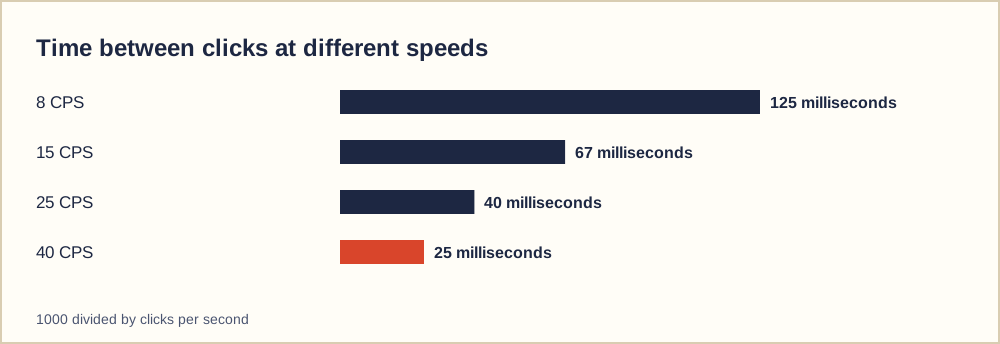
For ordinary clicking at 6 to 10 CPS, debounce makes no difference: each click is about 100 milliseconds apart. It starts to matter for butterfly and drag clicking, where some presses arrive very close together.
| Debounce setting | Effect |
|---|---|
| Long | Very reliable, but close presses may merge |
| Moderate | Good balance for most people |
| Short | More fast presses register, higher risk of double clicks on worn switches |
| None (optical switch) | No bounce to filter; speed set by other parts of the mouse |
Adjustable debounce
Some gaming mice let you adjust debounce in their companion software. Lowering it can raise butterfly and drag clicking scores. The trade-off is that on a mechanical switch, especially an older one, a short debounce makes unwanted double clicks more likely. If you lower it and start seeing accidental double clicks, raise it again.
Optical switches avoid most of this because there are no contacts to bounce, which is one reason some players prefer them for fast techniques.
Why click tests show different results on different mice
Two players with the same technique can get very different butterfly or drag scores simply because their mice use different debounce settings. When you compare scores with someone else, it helps to know what mouse they used. When you compare your own scores over time, use the same mouse.
Spotting debounce problems
If your mouse sometimes misses fast clicks, debounce may be too long. If it sometimes registers one press as two, debounce may be too short or the switch may be wearing. The double click test and a slow, steady round on the left click test are good ways to check: with deliberate single clicks, the count should match the number of presses you make.
Checking your mouse's behaviour
- Make ten slow clicks and check the count is ten
- Try a fast butterfly round and note the average
- Look for an adjustable debounce in the mouse software
- Raise debounce if double clicks appear
- Use the same mouse when comparing scores
Debounce on keyboards
Keyboards face the same problem as mice. Mechanical keyboard switches bounce, and keyboard firmware filters that bounce with its own debounce. Some enthusiast keyboards let you adjust it, trading reliability against speed in the same way as a mouse. A very short keyboard debounce can cause chattering keys, where one press types a letter twice.
That is why the spacebar counter counts only presses after a release: it relies on the keyboard to report clean presses and ignores held keys.
A practical approach to settings
If your mouse lets you adjust debounce, start at the manufacturer's default. Lower it in small steps while testing slow single clicks on the left click test after each change. As soon as slow clicks produce extra counts, go back one step. That gives you the shortest setting your switch can handle reliably. As the switch ages, you may need to raise it again.
Common questions
Can I change debounce on any mouse?
Only if the manufacturer provides a setting. Many mice have a fixed value set in firmware.
Is lower debounce cheating?
It is a hardware setting, not software that clicks for you. Some game servers still limit click rates, so check their rules.