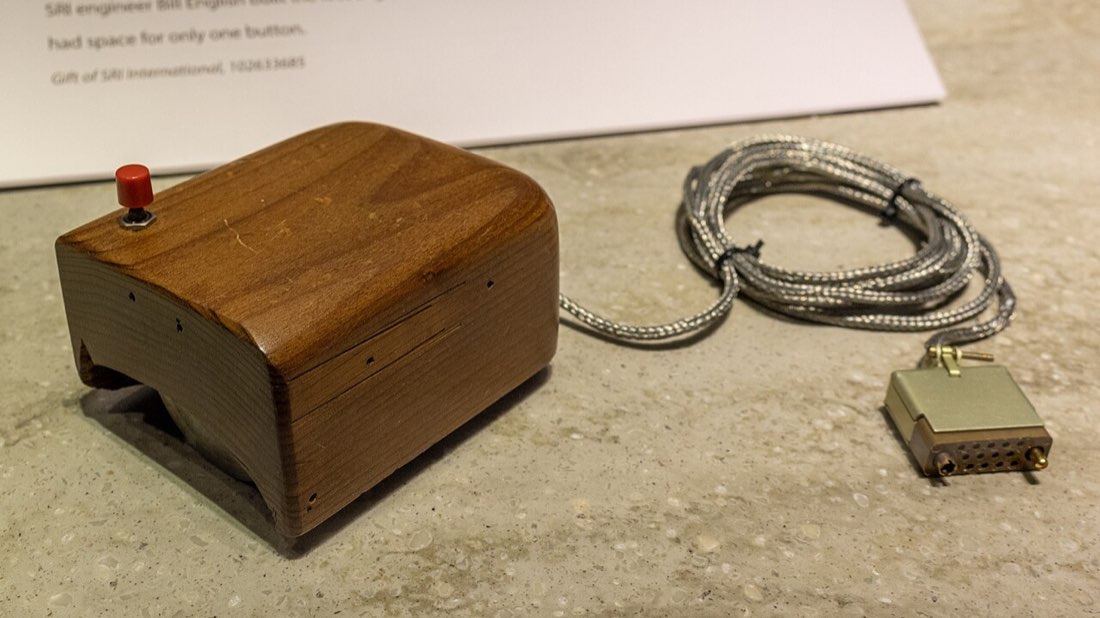
The mouse is so familiar that it is easy to forget it had to be invented. Its history spans research labs, personal computers and gaming, and each stage changed how clicking works.
The research prototype
In the 1960s, Douglas Engelbart and his team at the Stanford Research Institute were exploring new ways for people to work with computers. Among their inventions was a pointing device: a wooden box with two wheels underneath and a single button on top. It was shown publicly in a famous 1968 demonstration that also introduced ideas like hypertext and video conferencing.
Milestones of the mouse
- 1960s: wooden prototype with wheels
- 1970s: ball mice in research computers
- 1980s: mice arrive with personal computers
- 1990s: scroll wheels become common
- 2000s onward: optical and laser sensors
Ball mice and personal computers
During the 1970s, researchers developed mice that used a rolling ball to track movement, which was smoother than two wheels. Xerox's research computers used mice with graphical interfaces. In the 1980s, personal computers such as Apple's Lisa and Macintosh brought the mouse to a wide audience, and graphical operating systems made it an everyday tool.
Ball mice had a well-known weakness: the ball and rollers picked up dirt, and the pointer would start to skip until you cleaned them.
The scroll wheel
In the mid-1990s, mice with a scroll wheel between the buttons became widely available. Scrolling long documents and web pages became much easier, and the wheel click added a third button for many users.
Optical sensors
Around the turn of the century, optical mice replaced the ball with a small camera that takes many pictures of the surface per second and compares them to detect movement. There was no ball to clean, tracking was more precise, and the design opened the door to the high-performance sensors used in gaming mice today.
| Era | Tracking method | Typical problem |
|---|---|---|
| 1960s prototype | Two wheels | Bulky, awkward |
| Ball mice | Rolling ball and rollers | Dirt caused skipping |
| Optical mice | Camera and LED | Struggles on glass or glossy surfaces |
| Modern gaming sensors | High-speed optical sensors | Mostly marketing differences |
Gaming changes the mouse
Competitive gaming pushed mice toward lighter bodies, faster sensors, higher polling rates and more responsive switches. Click speed tests grew in popularity alongside games that rewarded fast clicking, as described in our guide to CPS in Minecraft PvP. Optical switches, adjustable debounce and wireless connections with very low latency are recent steps in the same direction.
What has not changed
Despite all the technology, the basic idea is the same as in the 1960s: move a small device to point, press a button to act. Every click on a MouseTally test passes through a switch that would be recognisable to the engineers who built the first mice, even if the sensor underneath is far more advanced.
How modern mice differ from early ones
- Optical sensors instead of balls
- Scroll wheels and extra buttons
- Lighter, shaped bodies
- High polling rates
- Optional optical switches
Other pointing devices along the way
The mouse was not the only answer to pointing. Light pens let users touch the screen directly, joysticks and trackballs appeared in early computers and arcade machines, and laptops adopted trackpoints and later trackpads. Touchscreens eventually brought direct pointing to phones and tablets. Each device suits different situations, and many people use several during a single day.
The trackball is a close relative of the ball mouse turned upside down: the ball is moved by the fingers while the device stays still. It remains popular with people who prefer not to move their arm.
Buttons over the years
Early mice had one, two or three buttons depending on the system. Some computers made do with a single button and used keyboard modifiers for other actions, while others favoured two or three. Today two buttons plus a clickable scroll wheel are standard, and gaming mice add side buttons for extra commands. The basic action of pressing a button with a finger, however, has hardly changed since the first prototypes.